Guide on how to report Binance crypto taxes in United Kingdom?


Introduction
Do you need to declare your Binance crypto transactions? Are you unsure about your tax duties in the United Kingdom? You are in the right place. This guide will help you understand.
Tax offices worldwide now get transaction data from crypto platforms. This global effort creates more tax transparency.
Waltio makes this process easier. Our tool calculates your crypto taxes with precision. We also help you fill out the right forms. These forms follow all United Kingdom tax rules.
Let’s look at how to report your Binance crypto activity.
What is Binance?
Binance is a cryptocurrency platform. It started in July 2017. It quickly became a top platform. Binance has over 300 million users worldwide. It handles most crypto trading.
Binance has no local office in the United Kingdom. Regarding its registration with the FCA, check the latest guidance from HMRC. This does not change your UK tax duties.
Binance’s registration status may affect data sharing. Check the latest guidance from HMRC. But it does not change your need to report crypto activity. You must report your crypto activity in the United Kingdom.
How does the HMRC know I have crypto on Binance?
Countries are working harder to prevent tax evasion. Global cooperation gives tax authorities more information.
DAC8 rules were adopted across the EU. This increased international cooperation. As of January 1, 2026, Binance must report your full transaction history. All other regulated platforms must do this too. They send data directly to tax offices.
Learn more about DAC8 and how it affects you
How are Binance transactions taxable in United Kingdom?
United Kingdom crypto taxes use Capital Gains Tax rules. They also use Income Tax rules. HMRC’s Cryptoasset Manual gives specific instructions.
A taxable event means:
- Selling crypto for regular money, like GBP.
- Using crypto to pay for goods or services.
- Trading one crypto for another crypto. This is also taxable for UK individuals.
Profits from these events are called “capital gains”. You pay tax on these gains. Each year, you have a Capital Gains Tax annual exempt amount of £3,000. Gains under this amount are not taxed.
Capital Gains Tax rates are 10% for basic rate taxpayers. They are 20% for higher rate taxpayers. These rates apply to gains over your annual allowance. Income Tax rates range from 20% to 45%. This depends on your total earnings.
Your crypto trading might be seen as a financial trade. If so, you may owe Income Tax. Check the latest HMRC guidance. This will confirm your situation.
Comprehensive guide to crypto taxes in United Kingdom
How to calculate gains and losses of Binance?
UK tax rules require “pooling” for identical assets. This is known as Section 104 pooling. Special “share matching” rules also apply within 30 days.
Section 104 pooling means you average the cost of all identical assets. This makes calculating gains easier when you sell.
The “30-day rule” is also called the Bed and Breakfasting rule. It applies if you sell crypto and buy the same crypto back within 30 days. The new crypto is linked to the sale. This stops you from creating fake losses.
Let’s look at an example: You bought 1 BTC for £5,000 in 2018. You bought another 1 BTC for £20,000 in 2024. In 2025, you sold 1 BTC for £25,000.
With Section 104 pooling, your average cost for BTC is (£5,000 + £20,000) / 2 = £12,500. When you sold 1 BTC, your taxable gain is £25,000 – £12,500 = £12,500.
How to declare staking & earn products from Binance?
For staking rewards, check the latest guidance from HMRC regarding their tax treatment, including when they are considered income and when they are taxed.
For valuing staking rewards, check the latest guidance from HMRC for specific valuation methods and timing.
For airdrops, check the latest guidance from HMRC regarding their cost basis and tax treatment, including whether they are considered income upon receipt and their status as capital assets upon sale.
For tax events related to receiving and selling rewards, check the latest guidance from HMRC to determine the applicable tax type (Income Tax or Capital Gains Tax) for each event.
How do I declare my gains and losses for Binance?
Report your crypto gains and losses using a Self Assessment tax return. You will need to use the SA100 form.
You must also fill out the SA108 supplementary page. This is for your Capital Gains Summary. On this form, list your crypto asset sales. Include their costs, and any gains or losses.
For full instructions, read HMRC’s Cryptoasset Manual. It gives detailed advice for reporting crypto transactions.
How to Import Binance operations into Waltio?
Waltio can calculate your tax numbers automatically. You can easily import your Binance transaction history. Use API keys or CSV export files to do this.
📝 Description
This article explains how to connect your Binance account to Waltio using the API.
👉 It allows you to automatically synchronize your transactions, reducing manual file uploads.
⚠️ Warnings
- The Binance API does not support all transaction types (see details below).
- Some transactions (e.g., delisted pairs, staking rewards, funding fees) must be imported by file.
- Transactions are only retrieved from 01/01/2021 onwards.
- The Full Statement for all years must also be added, it is essential for a complete recovery of all transactions: Full Statement.
💡 Recommendations
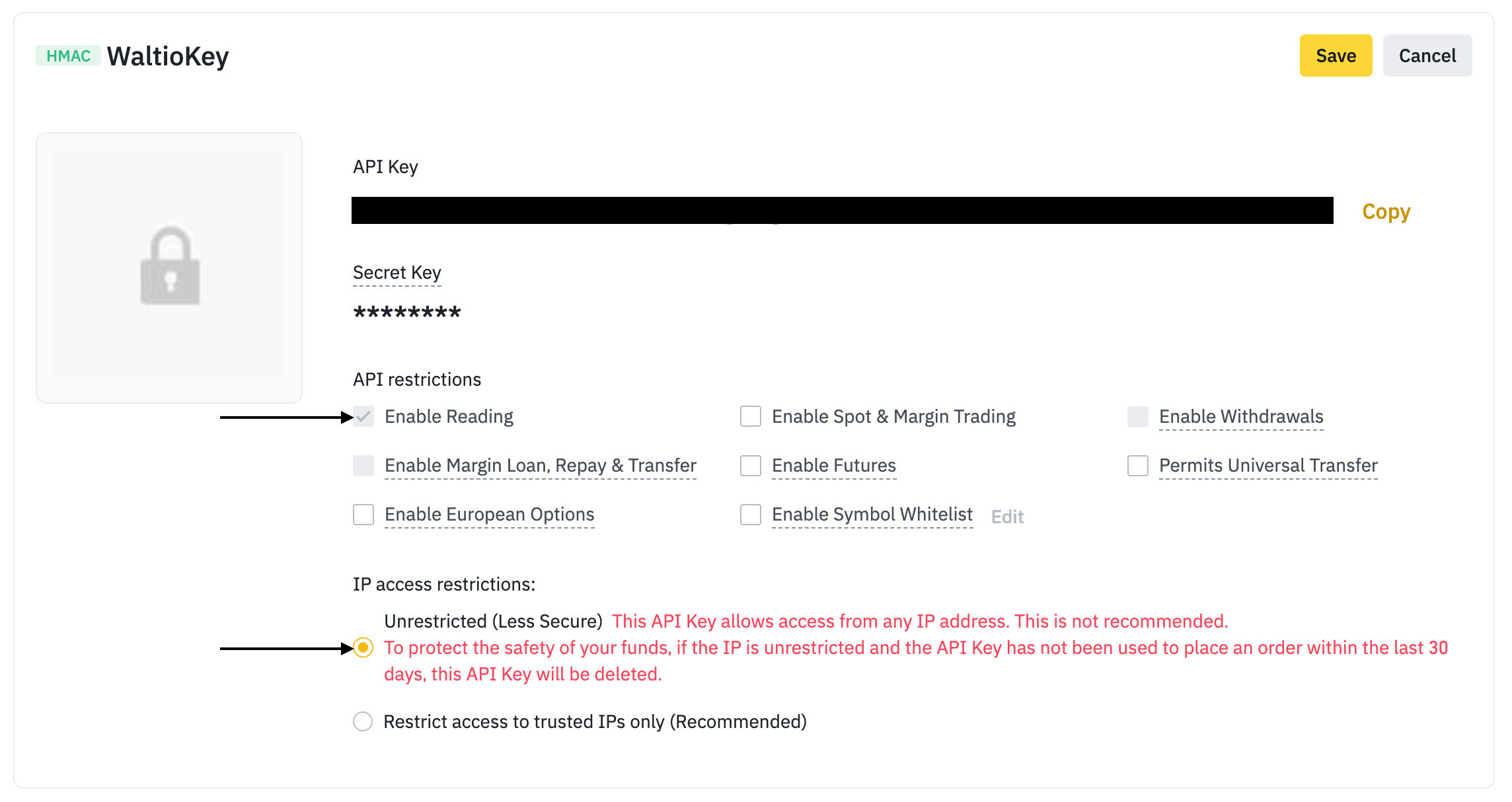
- Always check that the Enable Reading and Unrestricted boxes are selected.
- If you use Futures, make sure to enable the Futures option when creating the API.
- You can add multiple Binance APIs in Waltio if needed.
📂 How to access your data
- Log in to your Binance account.
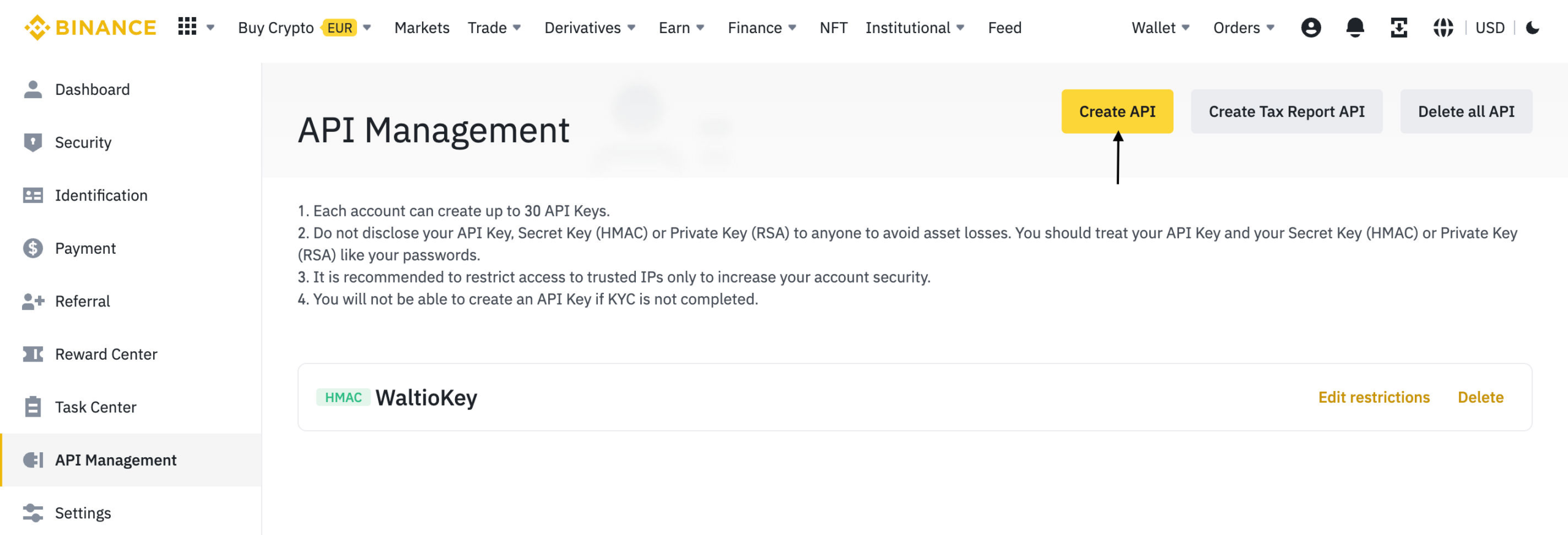
- Go to API Management.
- Click on Create API.
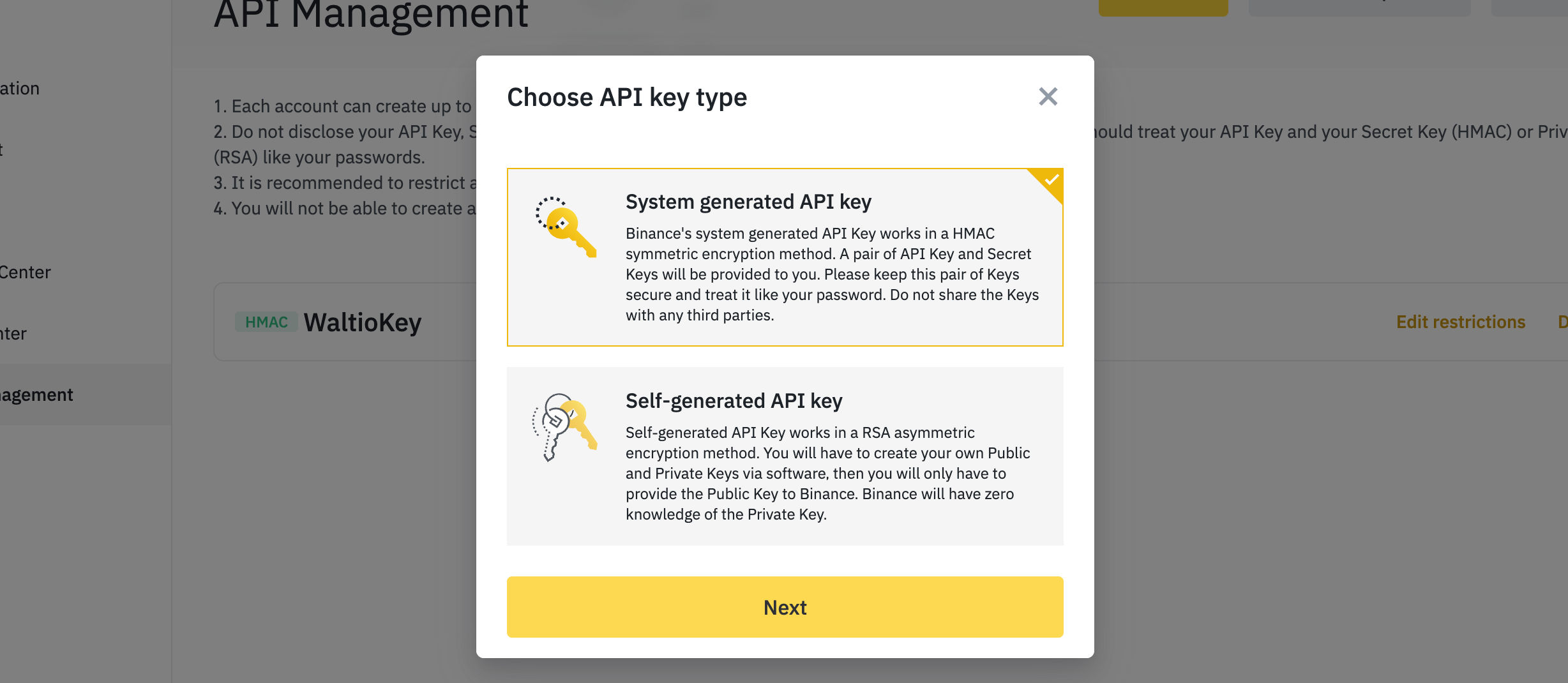
- Choose System generated API key and click Next.
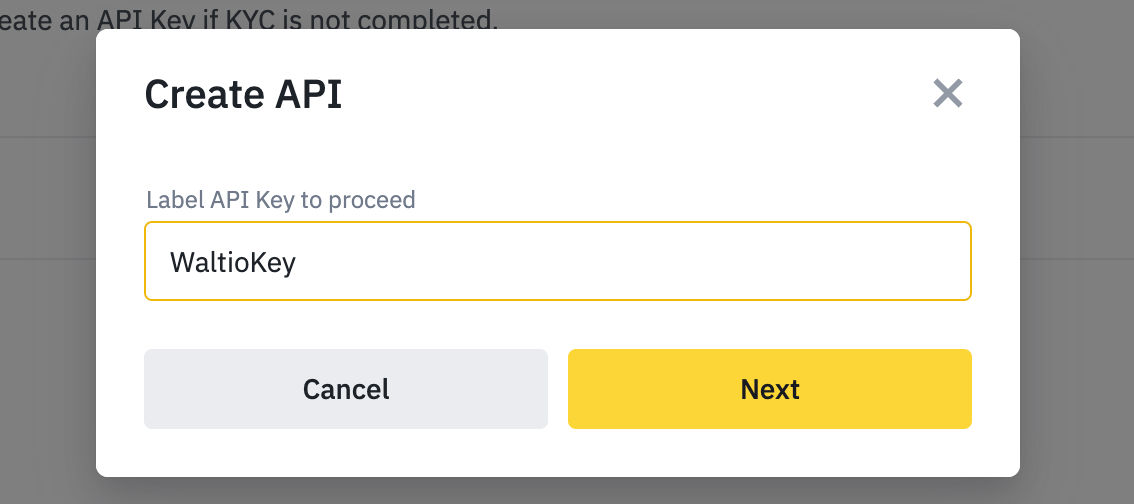
- Give your API a name (e.g., WaltioKey).
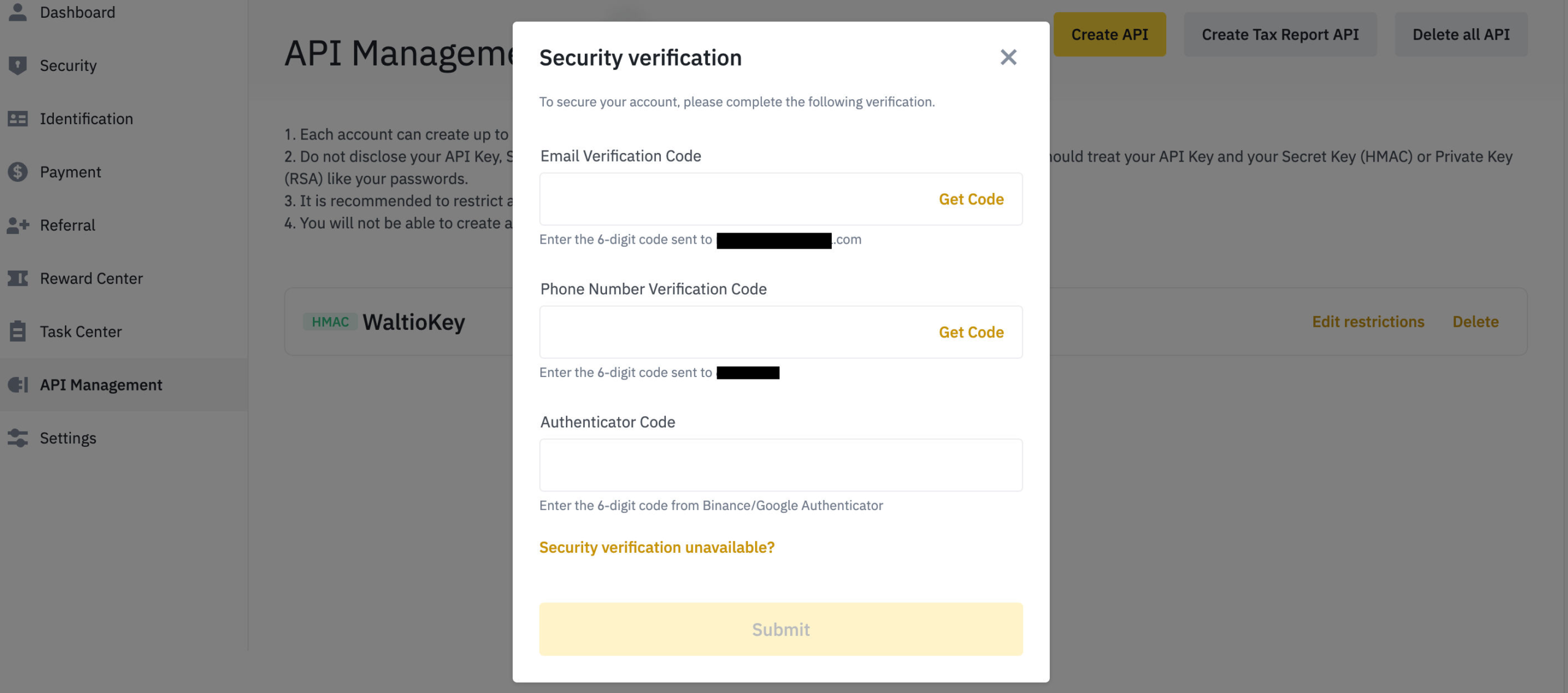
- Complete the phone and email security verification.
- Your new API key and secret are now created.
- Make sure the Enable Reading and Unrestricted boxes are checked.
📤 How to export your data
- Some transactions must be retrieved by file (e.g., staking, mining, P2P, delisted pairs).
- Follow the tutorial to generate your Complete Statement.
- You can also upload specific Binance files.
Summary of transaction support
| Transaction type | Supported by API? | Supported by File? | Where to find the file? |
|---|---|---|---|
| Cash Balance | Yes | Yes | Binance – File |
| Auto Invest | No | Yes | Binance – File |
| Liquidity Swap | No | Yes | Binance Liquidity Swap |
| Margin | No | Yes | Binance Margin |
| Commission History, Rebates, Shared Fees | No | Yes | Binance Commissions |
| Binance Card | No | Yes | Binance Card |
| Binance Card Cashback | No | Yes | Complete Statement |
| ETH 2.0 Staking (ETH & BETH) | No | Yes | Complete Statement |
| Launchpad | No | Yes | Complete Statement |
| Binance Pay | No | Yes | Complete Statement |
| Loans and Borrowing | No | Yes | Waltio file format |
| Mining | No | Yes | Waltio file format |
| Vanilla Options | No | Yes | Waltio file format |
| COIN-M Futures | No | Yes | Waltio file format |
| Peer to Peer (P2P) | No | Yes | Contact Binance support, then Waltio file |
➕ How to add your data to Waltio
- Go to the Connect my API page on Waltio.
- Enter your Binance API key and secret.
- Wait for synchronization (can take a few minutes to several hours).
Simplify your tax returns with Waltio
Waltio brings all your exchanges and wallets together. This makes your tax reporting simpler. Connect your accounts using API or file upload. You can track your crypto portfolio instantly. Generate UK-compliant tax reports with one click.
Create your free account today. No credit card or KYC is needed.