Guide on how to report Bit2Me crypto taxes in United Kingdom?


Introduction
Do you need help reporting your Bit2Me crypto to HMRC? Crypto tax rules can seem hard to understand. You are in the right place for clear guidance.
Tax authorities regularly get transaction data. This comes from crypto platforms. Global efforts to ensure tax compliance are growing.
Waltio makes this process simpler. We help you calculate your crypto taxes. We also prepare the right forms for United Kingdom rules.
This guide explains how to report your Bit2Me taxes.
What is Bit2Me?
Bit2Me is a crypto platform. It grew quickly around 2020-2021. The platform is registered with the Bank of Spain. More than one million users use it.
Bit2Me does not have a local office in the United Kingdom. It acts as a foreign exchange platform.
This means Bit2Me is not registered with the FCA in the UK. This can affect how data is shared automatically. But your duty to report all crypto activity stays the same. You must report your crypto activity in the United Kingdom, no matter where Bit2Me is registered.
How does the HMRC know I have crypto on Bit2Me?
Global efforts to prevent tax avoidance are becoming stronger. Governments across the world are better at sharing data.
The EU adopted new rules called DAC8 regulations. These rules boost international cooperation on tax matters. From January 1, 2026, Bit2Me and other regulated platforms must report your transactions. They send this data directly and automatically to tax authorities.
Learn more about DAC8 and how it affects you
How are Bit2Me transactions taxable in United Kingdom?
HMRC’s Cryptoasset Manual explains how crypto is taxed. You usually pay Capital Gains Tax (CGT) on profits. These profits come from “disposals.” A disposal means selling, trading, or otherwise giving up your crypto.
Here is what counts as a taxable event:
- Selling crypto for regular money (like GBP).
- Using crypto to buy goods or services.
- Giving crypto as a gift, if above certain values.
Swapping one crypto for another is also often a taxable event in the UK. Any profits from these events are usually capital gains. You pay Capital Gains Tax on these profits.
Income Tax rates vary from 20% to 45%. Capital Gains Tax is 10% for basic rate taxpayers. Higher or additional rate taxpayers pay 20% on their gains. You have an annual allowance of £3,000 for capital gains. This applies to the 2025/2026 tax year.
HMRC sees ‘investors’ and ‘traders’ differently for tax. Your specific actions decide if your profits are taxed as Capital Gains or Income. Always check the latest HMRC guidance for your situation.
Comprehensive guide to crypto taxes in United Kingdom
How to calculate gains and losses of Bit2Me?
UK tax rules use special ways to figure out crypto gains. HMRC uses ‘Section 104 pooling’ for identical crypto assets. This rule means you average the cost of your same crypto holdings.
The ‘30-day rule’ is also very important. It is sometimes called the Bed and Breakfasting rule. If you sell crypto and then buy the same crypto back within 30 days, special rules apply. This stops people from creating fake losses for tax reasons.
Here is an example:
Imagine you bought 1 BTC for £5,000 in 2018.
Then you bought another 1 BTC for £25,000 in 2024.
In 2025, you sell 1 BTC for £30,000.
Under Section 104 pooling, your average cost for 2 BTC would be (£5,000 + £25,000) / 2 = £15,000.
When you sell 1 BTC, its cost for tax purposes is £15,000, not the original £5,000 or £25,000.
Your capital gain would be £30,000 – £15,000 = £15,000.
How to declare staking & earn products from Bit2Me?
Staking rewards and other ‘earn’ products may be taxed as income in the UK. Check the latest guidance from HMRC. HMRC may classify this as “miscellaneous income.” Check the latest guidance from HMRC.
You must value these rewards in GBP. Use their Fair Market Value (FMV). This is the market price at the exact time you get them. Check the latest guidance from HMRC.
Airdrops can be seen as income or capital gains. This depends on how you got them. Check the latest guidance from HMRC. If an airdrop is income, its initial cost is usually zero. Check the latest guidance from HMRC. Always check the latest HMRC Cryptoasset Manual for airdrop rules.
If you receive staking rewards, this may constitute an income event. Any subsequent sale of these crypto assets may constitute a capital gains event, leading to a capital gain or loss. Check the latest guidance from HMRC for specific reporting requirements.
How do I declare my gains and losses for Bit2Me?
You report your crypto gains and losses each year. You do this using your Self Assessment tax return. Use the SA100 main form. Also, use the SA108 Capital Gains Summary page.
You must list all your crypto disposals. Include the date you disposed of the crypto. Also, state the money you received from the sale. Report how much you paid for it. Add any allowed costs for each disposal. The SA108 form helps you find your total capital gains and losses.
How to Import Bit2Me operations into Waltio?
Waltio makes it easy to collect and calculate your Bit2Me transactions. You can bring in your data in two ways. Use an API key or export a CSV file from Bit2Me.
📝 Description
This article explains how to connect your Bit2Me account to Waltio using the API.
👉 It allows you to automatically import your transactions to simplify your tax reporting.
⚠️ Warnings
- The API key and secret must be copied and stored safely.
- If the keys are deleted or modified, synchronization will stop and a new connection will be required.
💡 Recommendations
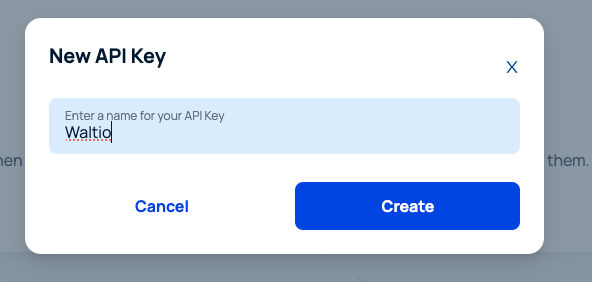
- Name your API key clearly (e.g., WaltioKey) for easier identification.
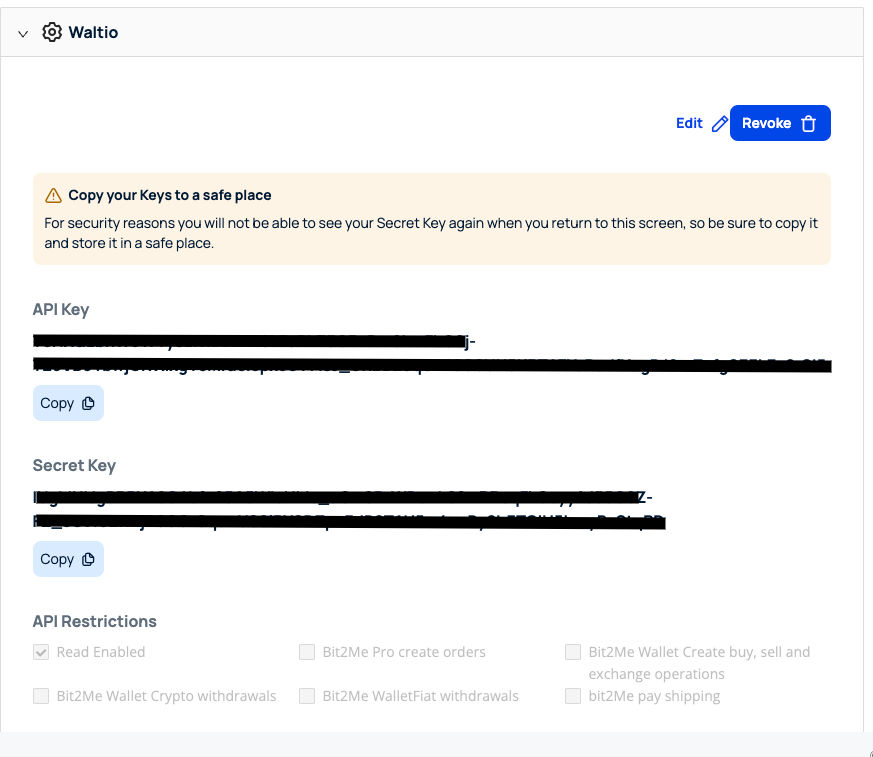
- Always keep your secret key in a secure location, as it will only be displayed once.
📂 How to access your data
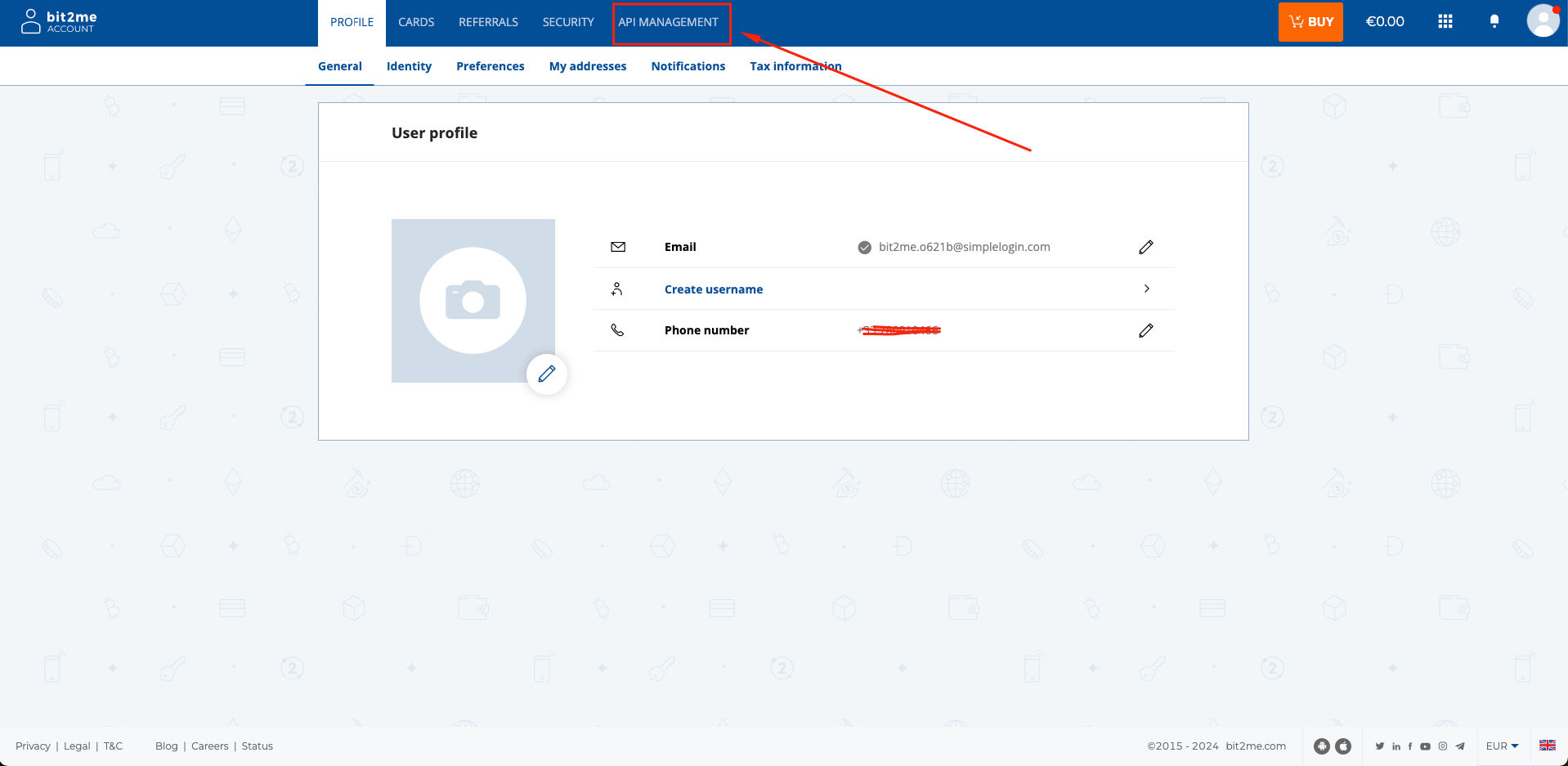
- Log in to your Bit2Me account.
- Click on API Management at the top of the screen.

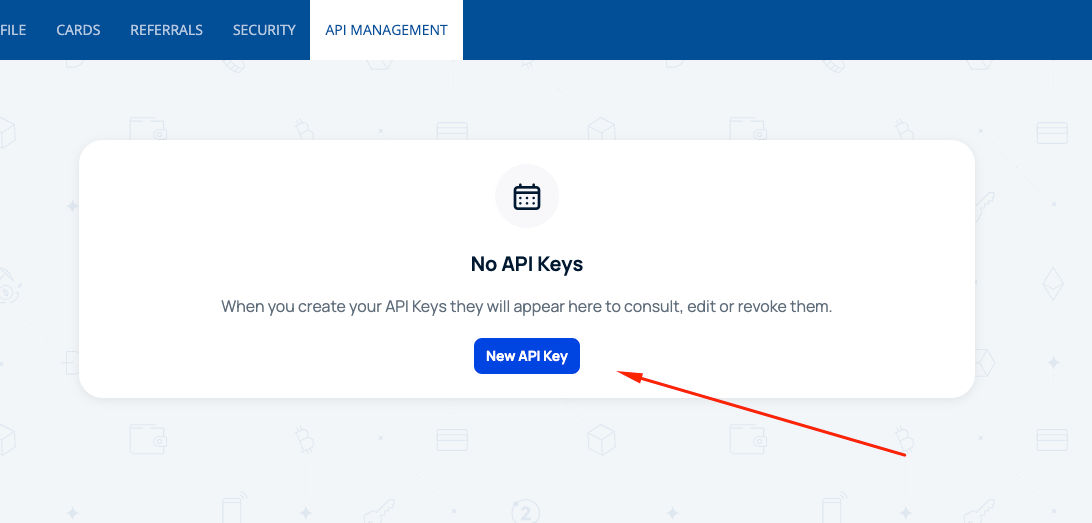
- Click on the blue button New API Key.
- Enter a name of your choice for the API and click Create.
- Copy your API Key and Secret Key.
📤 How to export your data
- No file export is required for Bit2Me, as the API retrieves all supported transactions automatically.
➕ How to add your data to Waltio
- Go to the Connect my API page on Waltio.
- Paste your Bit2Me API Key and Secret Key.
Simplify your tax returns with Waltio
Waltio brings together all your crypto exchanges and wallets. This makes your tax reporting much simpler. Connect your accounts using an API. You can also upload files. Track your crypto portfolio instantly. Then, create UK-compliant tax reports with one click.
Create your free account today. No credit card or KYC is needed.