Guide on how to report BITSTAMP crypto taxes in United Kingdom?


Introduction
Feeling confused about reporting your Bitstamp crypto to HMRC? Crypto tax rules can be tricky. This guide will explain what you need to do. It will help you understand the process.
Tax offices worldwide are getting better at tracking crypto. They receive more data from platforms. This makes your crypto holdings and trades more transparent.
Waltio makes this complex job easier. Our tool calculates your crypto tax accurately. It helps you prepare the right forms. This ensures you follow United Kingdom tax rules.
This guide covers all you need to know. It helps you report your Bitstamp activities.
What is BITSTAMP?
Bitstamp is a cryptocurrency exchange. This means it is a platform where you can buy and sell crypto. Bitstamp Europe S.A. operates in the United Kingdom. Always check its official registration with the FCA.
Where Bitstamp is registered affects how data is shared. However, it does not change your tax duties. You must report your crypto activity in the United Kingdom. This is true whether Bitstamp is registered or not.
How does the HMRC know I have crypto on BITSTAMP?
Countries are working harder to stop tax evasion. This affects how tax authorities track crypto assets.
The EU adopted new rules called DAC8. This has boosted international sharing of tax info. As of January 1, 2026, Bitstamp must report your transactions. All other regulated platforms must do this too. They send your full history directly to tax offices. This process is automatic.
Learn more about DAC8 and how it affects you
How are BITSTAMP transactions taxable in United Kingdom?
HMRC views cryptoassets as property for tax reasons in the UK. You usually pay Capital Gains Tax when you make a profit. This applies when you dispose of your crypto. Disposing means selling or exchanging it. This includes actions on platforms like Bitstamp.
HMRC lists these as “taxable events” for Capital Gains Tax:
- Selling crypto for regular money, like GBP.
- Trading one crypto for a different crypto.
- Using crypto to buy things or services.
- Giving crypto as a gift. This excludes gifts to a spouse, civil partner, or charity.
Profits from these events are “capital gains.” You pay tax on these gains. You do not pay tax on the total amount received. Your taxable gain is the profit made. It’s the selling price minus your original cost.
You have an annual exempt amount of £3,000 for Capital Gains Tax. You pay tax on any gains above this amount. Basic rate taxpayers pay 10% on crypto capital gains. Higher rate taxpayers pay 20%. Staking or mining income usually falls under Income Tax. Rates range from 20% to 45%. Always check HMRC’s Cryptoasset Manual for income tax details.
Most individuals are not “professional traders” for tax. They are usually “occasional individuals.” They pay Capital Gains Tax on their profits. Always check HMRC guidance to confirm your status.
Comprehensive guide to crypto taxes in United Kingdom
How to calculate gains and losses of BITSTAMP?
HMRC has specific ways to calculate crypto gains and losses. You must use “Section 104 pooling.” This method calculates the average cost of identical crypto assets. It averages the cost of all similar units you own.
The “30-day rule” also applies to crypto. It is sometimes called the Bed and Breakfasting rule. If you sell crypto and buy the same crypto within 30 days, the rule applies. The new purchase is matched to the sale. This stops people from creating artificial tax losses.
Here is an example for “Section 104 pooling”:
- Scenario: You bought 1 BTC for £5,000 in 2018. In 2024, you bought another 1 BTC for £50,000. Then, in 2025, you sell 1 BTC for £60,000.
- Result: Using Section 104 pooling, your average cost for the 2 BTC is £27,500 each. This comes from (£5,000 + £50,000) / 2. When you sell 1 BTC for £60,000, your capital gain is £32,500. This is £60,000 minus £27,500. This gain would then be taxed. Remember to also check if the 30-day rule applies to your trades.
How to declare staking & earn products from BITSTAMP?
HMRC usually treats staking rewards as miscellaneous income. Income from “earn” products is also miscellaneous income. You must value these rewards in GBP. Use their Fair Market Value at the moment you get them. This value becomes your taxable income.
Airdrops are generally treated the same way. Their original cost is usually seen as zero. Any value they have when you receive them could be income.
Remember, this can create two tax events. Receiving the crypto reward is the first event (Income). If you later sell that crypto, it is a second event. This second event creates a Capital Gain or Loss.
How do I declare my gains and losses for BITSTAMP?
You declare your crypto gains and losses using your Self Assessment tax return. Most people use the main tax form, SA100. You must also fill out the SA108. This is the Capital Gains Summary page.
On the SA108, you list your total capital gains and losses. This includes details of your sales or disposals. You also include what you paid for the crypto. Any allowed expenses must be listed too. You need to show how you calculated each crypto asset’s gain or loss. HMRC expects good records for all your numbers.
How to Import BITSTAMP operations into Waltio?
Waltio automates your crypto tax calculations. You can easily import your Bitstamp history. Connect using API keys for live data updates. Or, upload a CSV file with your past transactions.
📝 Description
The Bitstamp API allows you to connect your account to Waltio to automatically import your deposits, withdrawals, balances, and earnings.
👉 This avoids manual file uploads and ensures your tax reporting is complete.
⚠️ Warnings
- Waltio only requires Read permissions. Do not enable withdrawal rights.
- If you delete or modify your keys, synchronization will stop and your changes (labels, prices, etc.) will be lost.
- Always save your API key and secret before adding them to Waltio.
💡 Recommendations
- Leave the IP filter empty when creating the API key.
- Always associate the API key with your main account.
- Copy and store your secret key in a safe place before leaving the page.
📂 How to access your data
- Log in to your Bitstamp account.

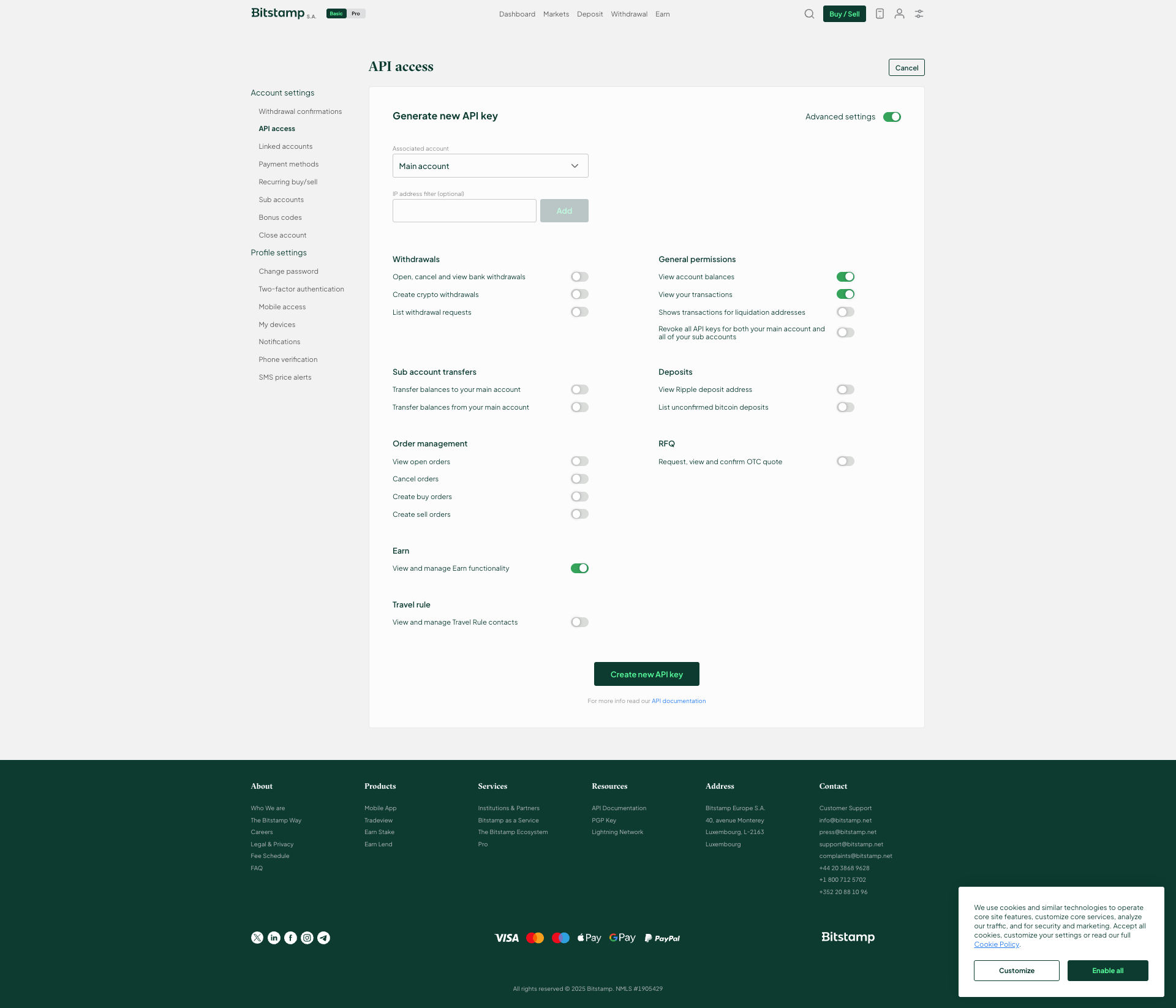
- From your account, go to Security, then to the API access page.

📤 How to export your data
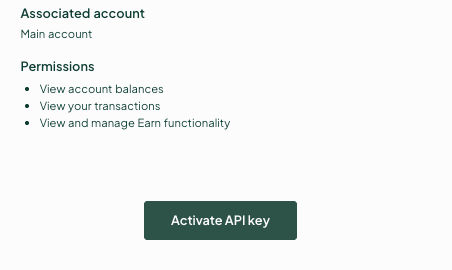
- Configure the API settings with the following permissions:
- IP filter: empty
- Associate with your main account
- Account balance
- View and manage Earn functionality
- Activate your key and copy your API key and secret.
➕ How to add your data to Waltio
- Go to the Connect my API page on Waltio.
- Enter your Bitstamp API keys.
Simplify your tax returns with Waltio
Waltio brings together all your exchanges and wallets. This makes your tax reporting easier. Connect your accounts using API or file upload. You can track your crypto at any time. Generate tax reports that meet UK rules with one click.
Create your free account today. No credit card or KYC is needed.