Guide on how to report Bitvavo crypto taxes in United Kingdom?


Introduction
Do you need to report your Bitvavo crypto activity to HMRC? Crypto tax rules can be tricky. You are in the right place to understand your obligations.
Tax authorities globally get data directly from crypto platforms. This worldwide effort makes sure all taxes are reported correctly.
Waltio makes this process simpler for you. Our tool calculates your crypto taxes. It helps you complete forms that follow UK tax rules.
This guide shows you exactly how to report your Bitvavo trades.
What is Bitvavo?
Bitvavo is a European crypto exchange. You can buy, sell, and store digital assets there.
Bitvavo UK LIMITED operates in the United Kingdom. It is registered with the Financial Conduct Authority (FCA). The FCA is the UK financial regulator. This registration helps prevent money laundering.
Always check its official registration status with the FCA. Its UK registration can affect data sharing. But this does not change your tax duties. You must still report your crypto activity in the UK.
How does the HMRC know I have crypto on Bitvavo?
Countries are working more to stop tax evasion. DAC8 rules are a big part of this global plan.
DAC8 rules are now active across the EU. This boosts global cooperation against tax evasion. From January 1, 2026, Bitvavo must report your trades. Other regulated platforms must do this too. They send your full transaction history directly to tax authorities. This happens automatically.
Learn more about DAC8 and how it affects you
How are Bitvavo transactions taxable in United Kingdom?
Some crypto actions create a tax event in the UK. Profits from these events are usually capital gains.
This means you typically owe Capital Gains Tax (CGT) on:
- Selling crypto for regular money, like GBP.
- Swapping one crypto for another.
- Paying for items or services with crypto.
You pay Capital Gains Tax on these profits. Basic rate taxpayers pay 10%. Higher or additional rate taxpayers pay 20%. There’s an annual exempt amount for CGT. It is currently £3,000. You pay no tax on gains under this limit each tax year.
HMRC might see you as a “professional trader” if you trade often. This means systematic and frequent trades. Then your profits could face Income Tax. Rates range from 20% to 45%. Most people are occasional investors. Their profits are under Capital Gains Tax. Always check HMRC guidance for your status.
Comprehensive guide to crypto taxes in United Kingdom
How to calculate gains and losses of Bitvavo?
In the UK, use “Section 104 pooling.” This calculates your crypto gains and losses. It combines all crypto of the same kind. This applies even if bought at different times. You use the average cost of the pool. This helps find your gain or loss when you sell.
A “30-day rule” also applies. It’s called the Bed and Breakfasting rule. If you sell crypto, then buy the same crypto back within 30 days. The new crypto is matched to the sale. This stops you from creating fake losses.
Consider this example:
You bought 1 BTC in 2018 for £5,000.
You bought another 1 BTC in 2024 for £40,000.
In 2025, you sell 1 BTC for £45,000.
Using Section 104 pooling: Your total pool is 2 BTC. The total cost is £45,000. The average cost for each BTC is £22,500. You sell 1 BTC for £45,000. Your capital gain is £45,000 minus £22,500. This equals £22,500. This differs from a FIFO method. FIFO means First-In, First-Out. The 30-day rule changes this. This applies if you buy back BTC soon after selling.
How to declare staking & earn products from Bitvavo?
For staking income and other earn products, check the latest guidance from HMRC regarding their taxability. HMRC may classify these as miscellaneous income, which could then face Income Tax. If such rewards are deemed taxable, you should value them in GBP at their fair market value when you receive them.
Regarding airdrops, check the latest guidance from HMRC. They may also be classified as miscellaneous income. If classified as income, their cost to you for capital gains purposes may be considered £0.
If these rewards (staking, earn products, airdrops) are deemed taxable and subsequently sold, they may be subject to a “double event” for tax purposes. The initial receipt of the reward may be considered an Income Tax event, and subsequently selling that crypto generally causes a capital gains event. To calculate the capital gain or loss, compare the crypto’s GBP value when received (if applicable as a cost basis) to its sale price.
How do I declare my gains and losses for Bitvavo?
Report your crypto gains and losses. Use your Self Assessment tax return. Most individuals use the main SA100 form. Then fill out the SA108 supplementary page. This is for Capital Gains Summary. It covers your crypto disposals.
On the SA108, list details of your disposals. Include the asset description and disposal date. Provide proceeds, costs, and the gain or loss. State if you claim any tax reliefs. Also note if the 30-day rule applies. HMRC’s Cryptoasset Manual has full details.
How to Import Bitvavo operations into Waltio?
Waltio simplifies calculating your Bitvavo taxes. You can easily import your transaction history. Use API keys or export CSV files from Bitvavo.
📝 Description
The Bitvavo API allows you to connect your account to Waltio to automatically import your deposits, withdrawals, and balances.
👉 This helps avoid manual file uploads and simplifies your tax reporting.
⚠️ Warnings
- Waltio only requires the “View information” permission.
- Do not enable withdrawal permissions.
- Two-Factor Authentication (2FA) must be enabled to generate an API key.
💡 Recommendations
- Save your API key securely before adding it to Waltio.
- Use a clear name (e.g., Waltio) for easier identification.
📂 How to access your data
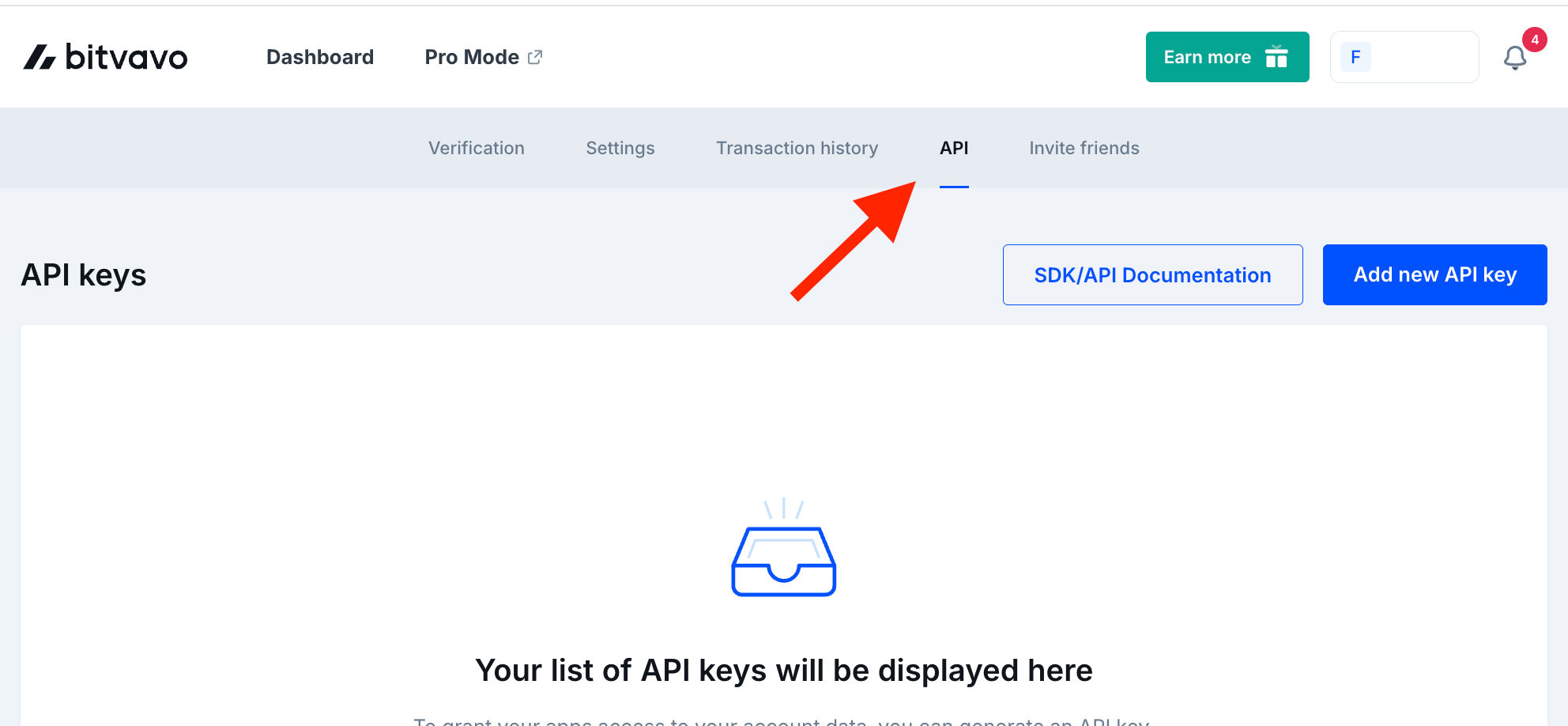
- Log in to your Bitvavo account.
- Click your name at the top right and select Settings.
- Go to the API tab.

📤 How to export your data
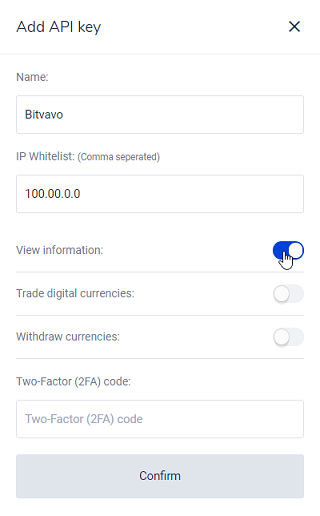
- Click Add new API Key.
- Enter a name for your key (e.g., Waltio Key).
- Check only View information, then click Confirm.
- Ensure your 2FA is activated.
➕ How to add your data to Waltio
- Go to the Connect my API page on Waltio.
- Enter your Bitvavo API keys.
Simplify your tax returns with Waltio
Waltio gathers all your exchanges and wallets. This makes tax reporting easier. Connect accounts using API or file upload. Track your crypto portfolio in real-time. Generate UK tax reports with one click.
Create your free account today. No credit card or KYC is needed.