Guide on how to report Bybit crypto taxes in United Kingdom?


Introduction
Are you unsure how to declare your Bybit crypto activity to HMRC? Many people find crypto tax reporting confusing. You are in the right place for clear guidance.
Tax authorities worldwide now get transaction data directly from crypto platforms. This global effort creates more transparency. It helps ensure compliance across borders.
Waltio is here to make this process easier for you. We help you calculate your crypto taxes correctly. We also populate the right forms. This ensures full compliance with United Kingdom tax rules.
This guide will walk you through the key steps. It will help you report your Bybit crypto taxes.
What is Bybit?
Bybit launched and has grown into a major cryptocurrency exchange. It offers many different trading services. Bybit operates in the United Kingdom via Bybit EU GmbH.
Users should check its official registration status. For example, check for VASP/PSAN with the FCA. Whether Bybit is registered locally with the FCA or not, your legal tax duties remain. You must still report your crypto activity in the United Kingdom. This applies whether Bybit is registered or not.
How does the HMRC know I have crypto on Bybit?
International efforts to prevent tax evasion have increased greatly. DAC8 regulations are now adopted across the EU. This has brought new levels of global cooperation on tax matters. From January 1, 2026, Bybit and other regulated platforms must report your transactions. They must send your full history directly to tax administrations. This happens automatically.
Learn more about DAC8 and how it affects you
How are Bybit transactions taxable in United Kingdom?
HMRC treats crypto assets as property for tax purposes. Profits from selling crypto assets are usually subject to Capital Gains Tax (CGT). Some activities, like staking, can create income tax liabilities.
The law defines a taxable event as:
- Selling crypto for regular money, like GBP.
- Paying for goods or services with crypto.
- Exchanging one type of crypto for another.
Profits from these events are called capital gains. You must pay tax on any profit made. This happens when you dispose of your crypto assets. Your taxable gain is the difference between your sale price and your original cost.
Capital Gains Tax rates are 10% for basic rate taxpayers and 20% for higher rate taxpayers. These rates apply to gains above the annual exempt amount, which is £3,000 per tax year. Income tax rates are progressive, ranging from 20% to 45%.
Your crypto activity might be seen as a trade. Then you could be classed as a professional trader. Your profits would be subject to Income Tax. National Insurance would also apply. Always check the latest HMRC guidance. This will confirm your specific status.
Comprehensive guide to crypto taxes in United Kingdom
How to calculate gains and losses of Bybit?
In the United Kingdom, you must calculate gains and losses. You use a “pooling” method. This includes Section 104 pooling. It also uses the “30-day rule.” This rule is also known as the Bed and Breakfasting rule. HMRC’s Cryptoasset Manual offers full details.
Under Section 104 pooling, all identical crypto assets are grouped. This happens even if you bought them at different times. You then calculate an average cost for these assets. When you sell assets, you use this average cost. This helps determine your gain or loss.
The 30-day rule applies if you sell crypto assets. Then you buy identical assets within 30 days. The newly bought assets are matched against the sale first. This rule stops people from creating artificial losses for tax reasons.
For example, imagine you bought 1 BTC for £5,000. You then bought another 1 BTC for £20,000. If you sell 1 BTC for £25,000, Section 104 pooling applies. Your cost for the sold BTC would be the average cost of your pool. It is not the cost of the first BTC you bought. Your total pool is 2 BTC for £25,000 (£5,000 + £20,000). Your average cost per BTC is £12,500. Selling 1 BTC for £25,000 gives a £12,500 gain (£25,000 – £12,500).
How to declare staking & earn products from Bybit?
HMRC usually views staking rewards as miscellaneous income. This income becomes taxable when you receive it. You must value staking rewards at their fair market value. Use the GBP value at the time you receive them.
Airdrops also count as income when received. Their acquisition cost is typically zero.
Remember, receiving a reward is one taxable event. This is subject to Income Tax. Selling that reward later is a separate taxable event. This is subject to Capital Gains Tax. This is often called a “double event.” More details are in HMRC’s Cryptoasset Manual.
How do I declare my gains and losses for Bybit?
You report your crypto gains and losses on your Self Assessment tax return. You will use the main SA100 form. You must also complete the SA108 supplementary page. This is the Capital Gains Summary.
On the SA108, you report your total disposals. You also list your allowable costs. Then you declare your total gains or losses. You also state how much of your annual exempt allowance you used. The form then calculates your net taxable gain. Always check HMRC’s Cryptoasset Manual. It has the most accurate and current instructions.
How to Import Bybit operations into Waltio?
You can easily import your Bybit transaction history into Waltio. This helps simplify your tax calculations. You can use API keys to do this. You can also export your CSV transaction files directly from Bybit.
📝 Description
The Bybit API allows you to connect your account to Waltio to automatically import your deposits, withdrawals, trades, and balances.
👉 This avoids manual file uploads and simplifies your tax reporting.
⚠️ Warnings
- Bybit API keys without IP addresses expire after 3 months, but you do not need to connect an IP address.
- Credit card purchases, one-click buy transfers, and recurring purchases cannot be retrieved by API or file. They must be added manually using the Waltio file format.
- If you delete or modify your keys, synchronization will stop and all modifications (labels, prices, etc.) will be lost.
- If you add files containing trades already read by the API, duplicates may occur.
💡 Recommendations
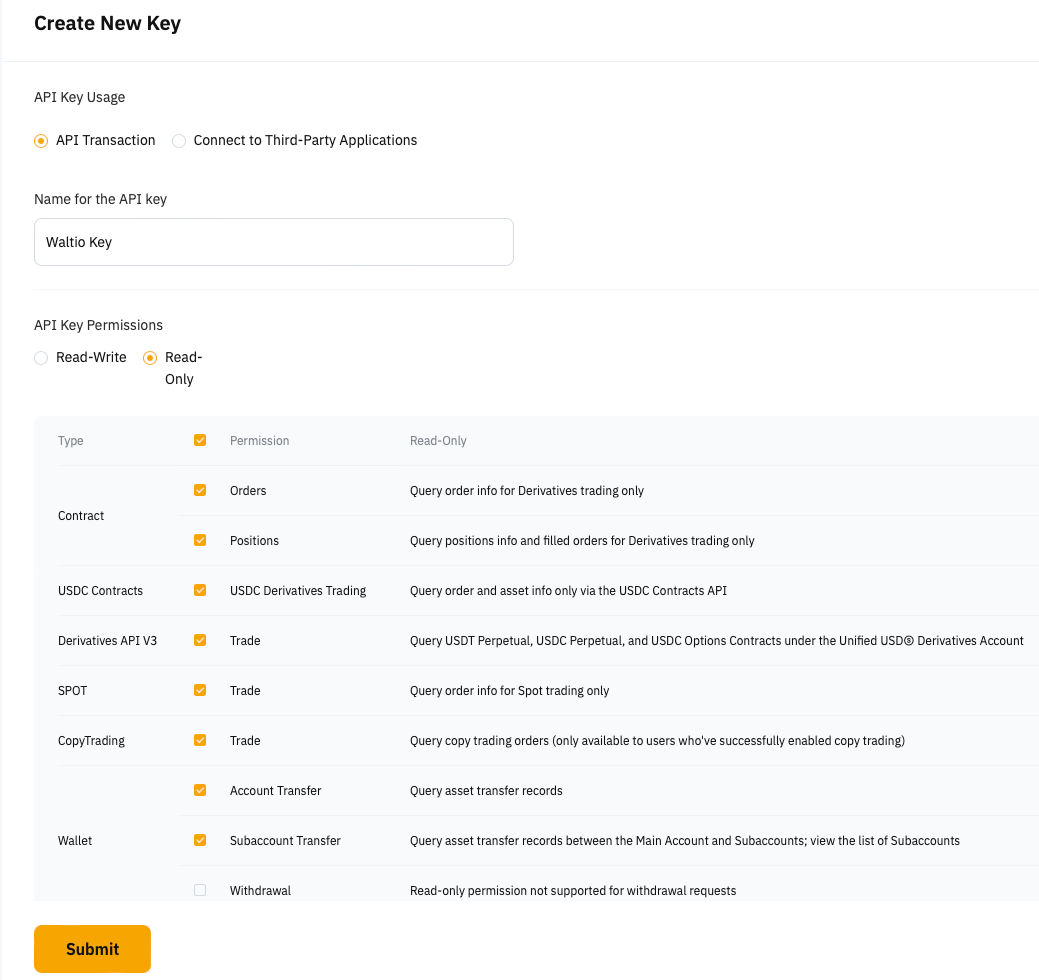
- Always select Read-only permissions when creating the API key.
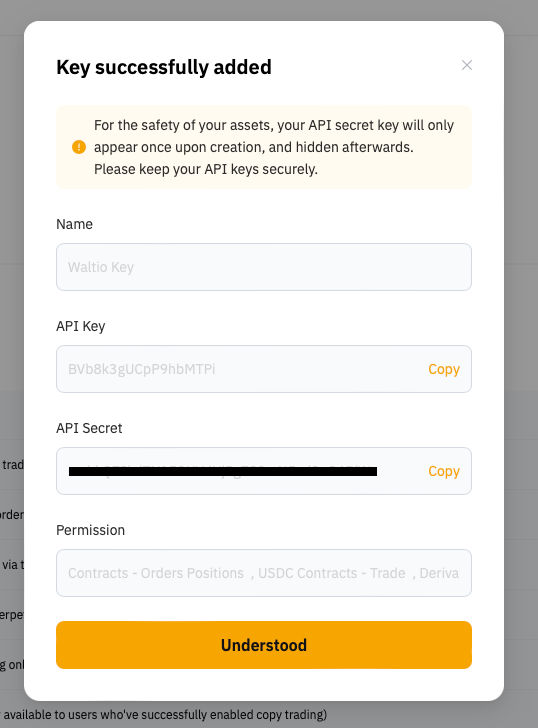
- Save your API key and secret immediately after creation.
- Enable Google 2FA to generate an API key.
- Contact support via the chatbot if your keys were corrected after an error, as synchronizations run weekly.
📂 How to access your data
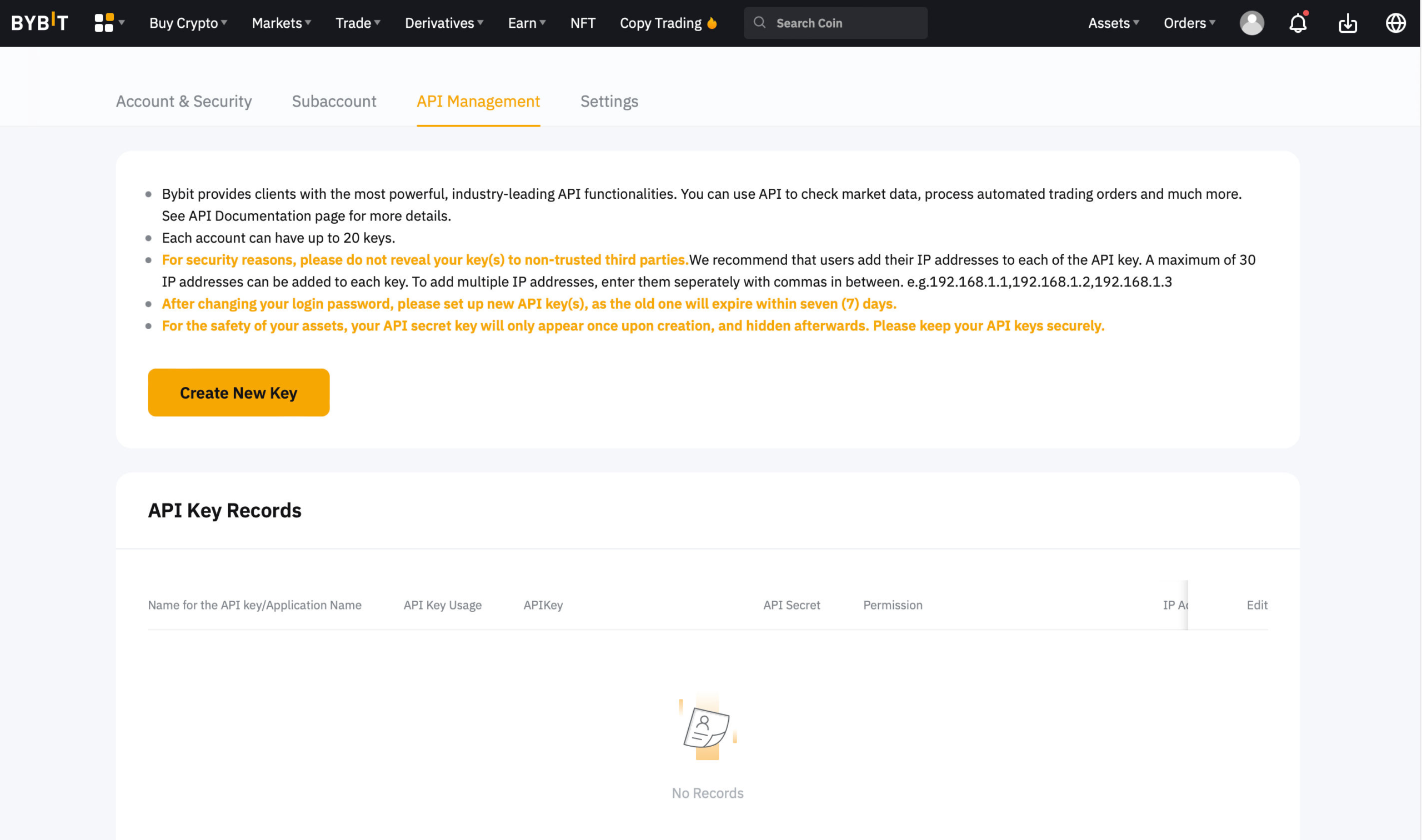
- Log in to your Bybit account.

- Click your profile (top right) and select API.
Go directly to API Management.

📤 How to export your data
- Click Create a new key.
- Enter a name (e.g., Waltio Key), check the read-only box, and confirm the correct permissions.
- Click Submit and confirm with Google 2FA.
- Your keys are now created.

➕ How to add your data to Waltio
- Go to the Connect my API page on Waltio.
- Enter your Bybit API keys.
Simplify your tax returns with Waltio
Waltio gathers all your exchanges and wallets in one place. This makes crypto tax reporting easier. Connect your accounts using API or file upload. You can track your crypto portfolio in real-time. Generate United Kingdom compliant tax reports with just one click.
Create your free account today. No credit card or KYC is required.