Guide on how to report Coinhouse crypto taxes in United Kingdom?


Introduction
Are you unsure how to report your Coinhouse crypto taxes in the United Kingdom? You are not alone. Many people find crypto tax rules confusing. This guide will help you.
Tax authorities can now access your platform transaction data. This global trend aims for more transparency in all financial activities.
Waltio makes this process simple for you. We help calculate your crypto taxes. We also fill out the correct forms for you. This is fully compliant with United Kingdom rules.
This article shows you how to report your Coinhouse crypto activity to HMRC.
What is Coinhouse?
Coinhouse is a cryptocurrency exchange platform. It lets users buy, sell, and manage digital assets. Coinhouse operates in the United Kingdom via Coinhouse Custody Services (CCS).
You should check the official registration status (e.g., VASP) with the FCA. VASP stands for Virtual Asset Service Provider. This helps you understand the platform’s regulatory standing.
Local registration may affect data sharing with HMRC. However, it does not change your tax duties. You must report your crypto activity in the United Kingdom. This is true whether Coinhouse is registered or not.
How does the HMRC know I have crypto on Coinhouse?
Efforts to stop tax evasion have grown worldwide. This includes actions related to crypto assets.
DAC8 regulations are now active across the EU. DAC8 is a set of rules for automatic information exchange. This has greatly increased international tax cooperation. As of January 1, 2026, Coinhouse and other regulated platforms must report your full transaction history. They must send this data directly to tax authorities automatically.
Learn more about DAC8 and how it affects you
How are Coinhouse transactions taxable in United Kingdom?
HMRC states which events are taxable. You must declare any profits you make.
Taxable events usually include:
- Selling crypto for regular money, like GBP.
- Using crypto to pay for goods or services.
Exchanging one crypto for another may have tax implications. Check the latest guidance from HMRC.
Profits from these events are called “capital gains”. You must report these gains. This applies if they are more than your annual exempt amount.
Income Tax rates range from 20% to 45%. These rates increase with your income. Capital Gains Tax (CGT) rates are 10% for basic rate taxpayers. They are 20% for higher rate taxpayers. You only pay CGT on gains above your annual exempt amount. This amount is £3,000 per tax year.
If you trade crypto often, HMRC might see you as a professional trader. This can change how your profits are taxed. You should review the latest HMRC guidance. This will confirm your tax status.
Comprehensive guide to crypto taxes in United Kingdom
How to calculate gains and losses of Coinhouse?
You must use specific methods to calculate gains and losses. HMRC mainly uses “Section 104 pooling” and “share matching rules” for crypto assets.
Section 104 pooling means you group all crypto of the same type. This creates one “pool.” When you sell, the cost of that crypto is its average cost from the pool. This method helps you find your capital gain or loss.
The “30-day rule” also applies here. It is also known as the Bed and Breakfasting rule. If you sell crypto and buy the same type back within 30 days, the new buy is linked to the earlier sale. This rule stops people from creating artificial losses for tax purposes.
Here is an example:
- You bought 1 BTC in 2018 for £5,000.
- You bought another 1 BTC in 2024 for £40,000.
- In 2025, you sell 1 BTC for £50,000.
Your total cost for 2 BTC is £5,000 + £40,000 = £45,000. Under Section 104 pooling, your average cost per BTC is £22,500. So, your cost for tax purposes when you sold 1 BTC is £22,500. This means your capital gain is £50,000 – £22,500 = £27,500.
How to declare staking & earn products from Coinhouse?
The tax treatment of staking rewards may vary. Check the latest guidance from HMRC for specific rules regarding these products. These may be classified as miscellaneous income. Check the latest guidance from HMRC.
You must value these rewards in GBP. Use their Fair Market Value. Fair Market Value is the price they would sell for on the open market. This valuation happens the exact moment you receive them.
The tax treatment of airdrops may vary. Check the latest guidance from HMRC. Their cost basis when received may be considered zero. Check the latest guidance from HMRC. This applies for future capital gains calculations.
There may be multiple taxable events. Check the latest guidance from HMRC. First, receiving the reward is an income event. Second, selling that rewarded crypto later is a capital gains event.
How do I declare my gains and losses for Coinhouse?
You report your crypto gains and losses using your Self Assessment tax return. A Self Assessment tax return is a form you use to tell HMRC about your income and capital gains. You will use the main SA100 form.
You also need to fill out the SA108 form. This is the Capital Gains Summary supplementary page. On this form, you will provide certain details. These include your total money from sales, your allowable costs, and your net capital gains or losses. Allowable costs are expenses you can deduct from your gains. Net capital gains or losses are your gains minus your losses.
How to Import Coinhouse operations into Waltio?
Waltio helps you calculate your tax figures correctly. You can easily import your Coinhouse transaction history.
You can typically do this using API keys or a CSV file. An API key is a unique code that allows software to talk to another service. A CSV file is a simple spreadsheet file. You can export this file from the Coinhouse platform. This data then fills your Waltio account.
📝 Description
This article explains how to export your transaction history from Coinhouse in order to import it into Waltio.
👉 Useful for capital gains calculation and ensuring better data quality.
⚠️ Warnings
- Opening, modifying, or renaming the CSV file may make it unreadable by Waltio.
- The file must be named “transaction history” → Keep the Coinhouse interface in French to ensure this.
💡 Recommendations
- If transactions appear out of order, shift their timestamps by 1 minute in either direction to restore chronological order.
📂 How to access your data
- Log in to your Coinhouse account.
- Go to the History page.
- Click on Export.
- Select Advanced export.

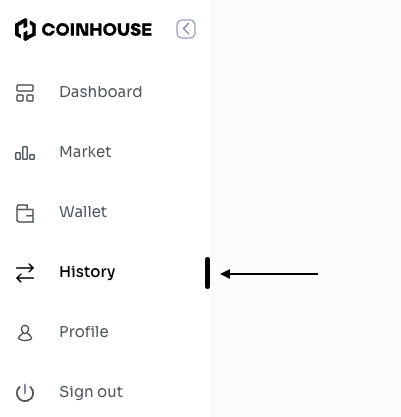

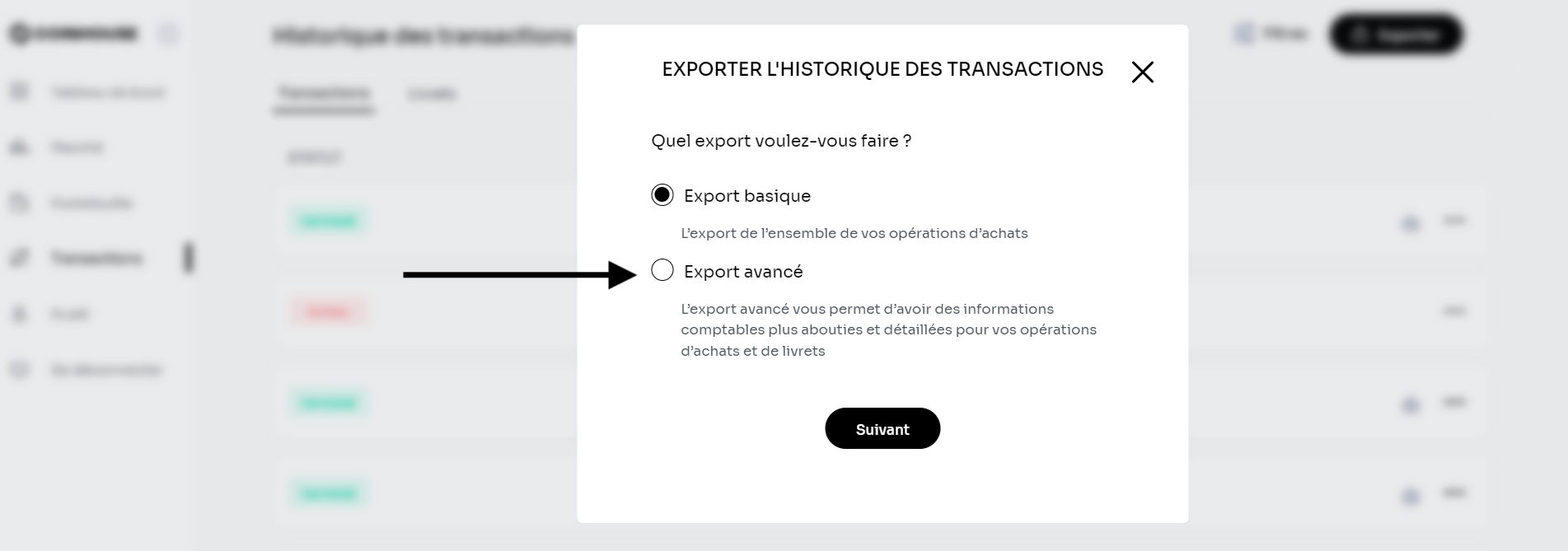
📤 How to export your data
- Download the file named transaction history (ensure the interface is set to French).
➕ How to add your data to Waltio
- Go to the Import a file page on Waltio.
- Upload this file.
Simplify your tax returns with Waltio
Waltio gathers all your exchanges and wallets. This makes your tax reporting easier. Connect your accounts using an API or by uploading a file. You can track your crypto portfolio in real-time. You can also create United Kingdom compliant tax reports with one click. Compliant means it follows the rules.
Create your free account today. No credit card or KYC is needed.