Guide on how to report eToro crypto taxes in United Kingdom?


Introduction
Are you unsure how to declare your eToro crypto activity to HMRC? You are not alone. Many find crypto tax reporting confusing. But you have found the right guide.
Tax offices worldwide are improving how crypto transactions are viewed. They now get transaction data directly from platforms like eToro. This creates more transparency. It helps make sure tax rules are followed.
Waltio simplifies this process for you. Our platform calculates your crypto taxes. It follows United Kingdom rules. This helps you fill the necessary forms correctly.
This guide will show you everything. You will learn how to report your eToro crypto taxes in the United Kingdom.
What is eToro?
eToro is a major financial services platform. It is also a social investment platform. It started in 2007 and has grown to serve millions of users. It is known as a leading social trading platform.
eToro operates in the United Kingdom through eToro (Europe) Ltd. Users should always check its registration status with the Financial Conduct Authority (FCA). The FCA regulates financial firms, and checking its registration ensures the company is regulated for cryptoasset services in the UK, if applicable.
Local registration might affect how data is shared with HMRC. However, it does not change your tax duties. You still must report your crypto activity in the United Kingdom. This is true whether eToro is registered or not.
How does the HMRC know I have crypto on eToro?
International cooperation against tax evasion has increased a lot. This effort includes better sharing of information about cryptoassets.
New DAC8 regulations now apply across the EU. These rules have greatly boosted international tax cooperation. DAC8 is a new EU rule for sharing crypto data with tax offices. As of January 1, 2026, eToro and all other regulated platforms must report your full transaction history. They send this data directly to tax administrations. This happens automatically. This means HMRC will receive details about your eToro crypto activities.
Learn more about DAC8 and how it affects you
How are eToro transactions taxable in United Kingdom?
HMRC views cryptoassets as property for tax purposes. This means you might pay Capital Gains Tax (CGT) when you sell or exchange cryptoassets. This tax applies to profits from selling assets.
A taxable event is when tax rules might apply. These events may include:
- Selling crypto for regular money, like GBP.
- Paying for goods or services with cryptoassets.
- Exchanging one cryptoasset for another.
Check the latest guidance from HMRC for a comprehensive list of taxable events.
Profits from these events are called capital gains. You make a profit when your selling price is more than your purchase price. You make a loss when your purchase price is more than your selling price.
Capital gains above your tax-free allowance are taxed. The current annual exempt amount for CGT is £3,000. Gains over this amount are taxed. Basic rate taxpayers pay 10% on capital gains, while higher and additional rate taxpayers pay 20%. Check the latest guidance from HMRC for current rates and thresholds.
HMRC treats occasional individuals and professional traders differently. You should check the latest HMRC guidance. This confirms your specific tax status. It will show if Income Tax or Capital Gains Tax rules apply to your activities.
Comprehensive guide to crypto taxes in United Kingdom
How to calculate gains and losses of eToro?
The United Kingdom has specific rules. These rules are for calculating crypto gains and losses. You must use “Section 104 pooling.” This rule averages the cost of identical cryptoassets you own. It creates a single pool for these assets. You then calculate an average cost for them.
Another key rule is the “30-day rule.” It is also known as the Bed and Breakfasting rule. If you sell crypto at a loss, then buy the same type within 30 days, specific rules apply. You must link the newly bought crypto with the earlier sale. This rule stops using losses to lower tax in a way HMRC doesn’t allow.
Consider this example:
- You bought 1 BTC for £5,000 at an earlier date.
- You bought another 1 BTC for £30,000 at a later date.
- You sold 1 BTC for £20,000 at a subsequent date.
Under Section 104 pooling, your average cost for 2 BTC is (£5,000 + £30,000) / 2 = £17,500. When you sell 1 BTC, its original cost is £17,500. This results in a capital gain of £2,500 (£20,000 – £17,500). If the 30-day rule applies, it might change how you match the sale with any recent purchases. Always check if this rule impacts your situation.
How to declare staking & earn products from eToro?
HMRC usually treats rewards from staking and other ‘earn’ services as other income. Staking means locking up crypto to support a network and earn rewards. You must declare this income for tax purposes.
You value these rewards at their true market value in GBP. This valuation happens at the exact moment you receive them. For example, if you get a staking reward worth £50, that £50 is considered income.
Airdrops also count as income. Airdrops are free crypto given to your wallet. Their purchase price is usually zero.
Remember, receiving the reward is one tax event (Income Tax). Selling that cryptoasset later is another tax event (Capital Gains Tax). You must account for both events separately.
How do I declare my gains and losses for eToro?
You declare your crypto gains and losses. You do this through your Self Assessment tax return. Individuals typically use forms SA100 and SA108.
The SA100 is your main tax return form. The SA108 is the Capital Gains Summary. This is where you report your specific crypto gains and losses. Here, you need to provide details. These include the asset type, purchase date, sale date, sale price, and eligible expenses.
You calculate your total capital gains and losses for the tax year. Make sure you apply the tax-free allowance correctly. For detailed guidance, see HMRC’s Cryptoasset Manual. It has full information on reporting crypto income and gains.
How to Import eToro operations into Waltio?
Waltio makes calculating your eToro tax figures easy. You can import your transaction history. You can use an API key or upload a CSV file. An API key is a special key for secure data connection. A CSV file is a spreadsheet file. This automatically calculates your gains and losses according to UK tax rules.
📝 Description
This article explains how to export your transactions from eToro in order to import them into Waltio.
👉 Useful for consolidating your deposits, withdrawals, and crypto trades (we automatically filter out non-crypto operations).
⚠️ Warnings
- Opening and saving a file may alter its structure and block its automatic reading by our software.
- Once downloaded, do not open or modify the file.
- Reading eToro files is complex: you must upload your complete transaction history every year.
- The capital gains calculation system used by eToro is not the French one. Results may therefore differ from those given by Waltio.
💡 Recommendations
- You no longer need to delete non-crypto transactions: we handle that automatically.
- Keep your complete files for future fiscal years.
📂 How to access your data
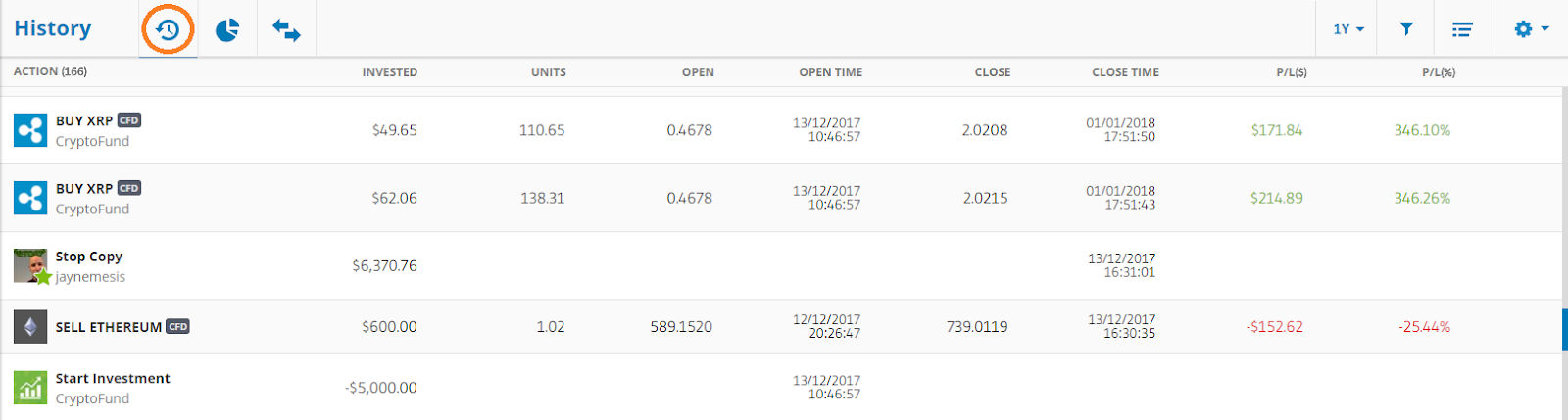
- Click on the Wallet tab in the left sidebar, then on the stopwatch icon.
- Go to History to view your closed trades, copied traders, and CopyPortfolios.

📤 How to export your data
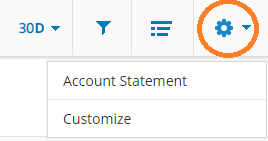
- Click on the settings wheel (top right).
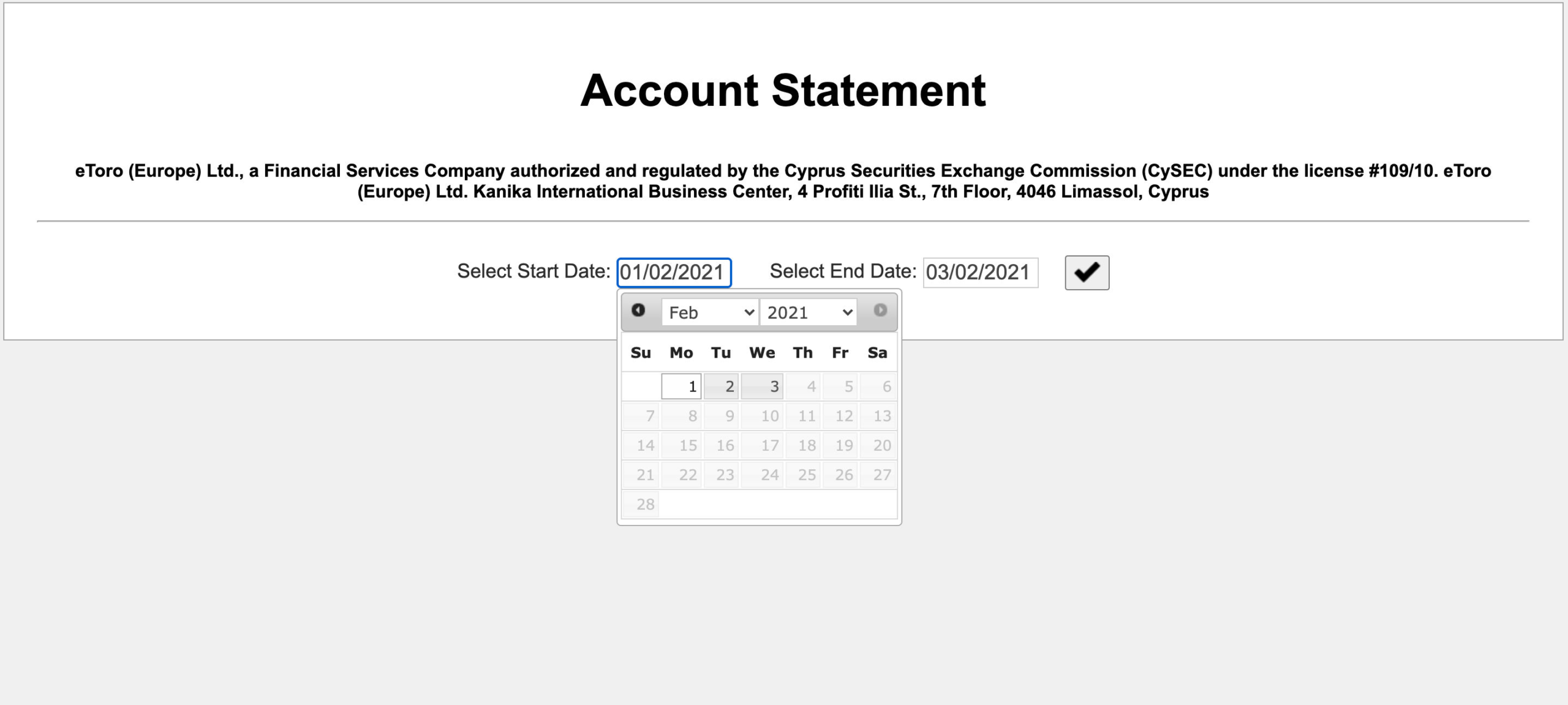
- Select Account Statement to generate a complete report (deposits, withdrawals, open and closed positions, etc.).
- Choose a date prior to your first transaction in Select Start Date.
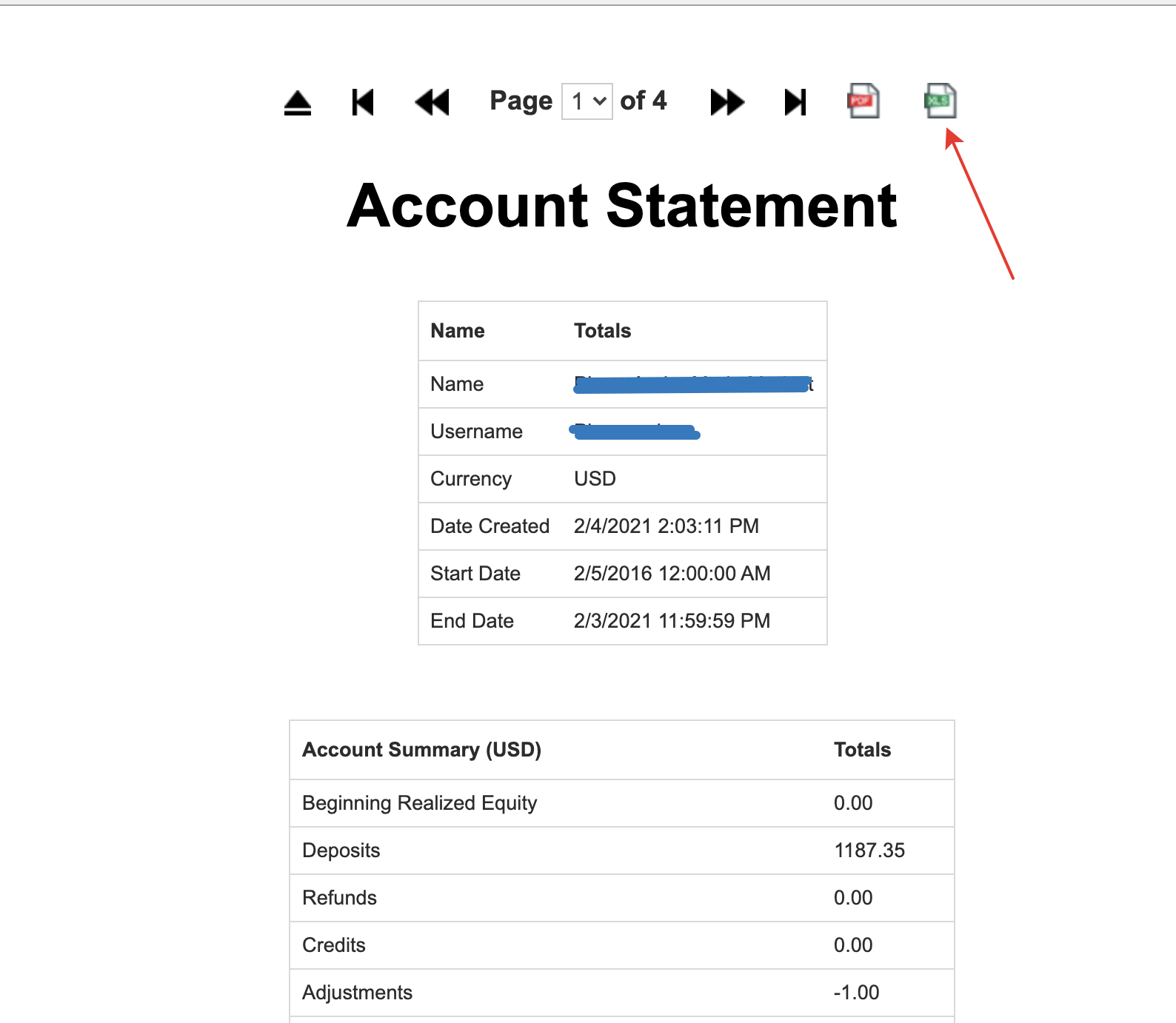
- Export the report in Excel format (.xlsx required).
- Click the Excel button.
➕ How to add your data to Waltio
- Save your file.
- Go to the Import a file page on Waltio.
- Upload this file.
Simplify your tax returns with Waltio
Waltio gathers all your exchanges and wallets. This makes your tax reporting easier. Connect your accounts using API or file upload. You can track your crypto portfolio in real-time. Generate United Kingdom compliant tax reports in just one click.
Create your free account today. No credit card or Know Your Customer checks are required.